Custom Google Sheets systems and Apps Script development
I work with Google Sheets, from fixing formulas and summarising data to building Apps Script systems with a web interface. Examples include inventory and quotes, income and expenses, and job tracking. Try the demos below, then tell me about your workflow so we can agree on the scope through Fastwork.
Try the demos 3
These are demo projects with fictional business names and sample data.
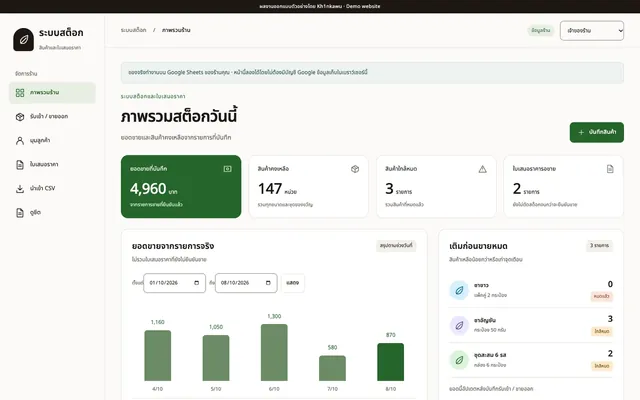
Inventory and quote management
Google Sheets + Apps Script with a web interface
As built ฿3,000 · TH
Google Sheets system package with web interface
Open Inventory and quote management (opens in a new tab)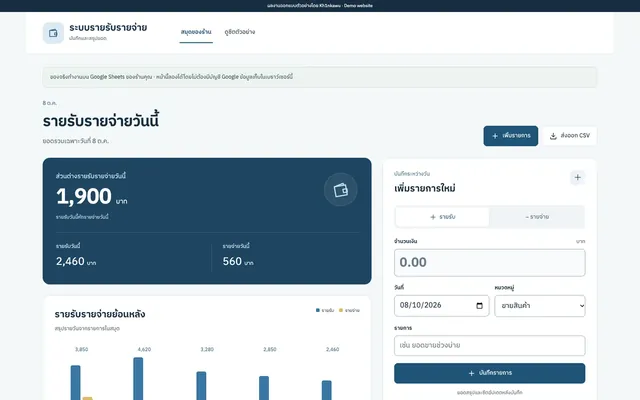
Income and expense tracker
Google Sheets, 3 tabs, daily summary
As built ฿1,500 · TH
Formula / automation script package, 1 task
Open Income and expense tracker (opens in a new tab)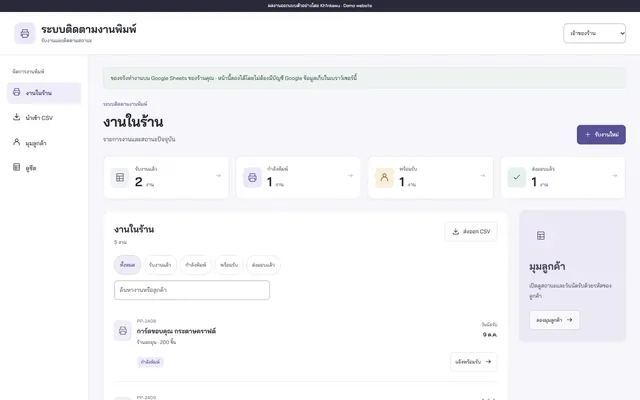
Print job tracking system
Google Sheets + Apps Script, job status lookup by code
As built ฿3,000 · TH
Google Sheets system package with web interface
Open Print job tracking system (opens in a new tab)
What kind of work can Google Sheets and Apps Script handle?
Google Sheets stores data and performs calculations. Apps Script automates repetitive tasks or provides a web interface for entering and searching the data in your sheet. I build to the scope we agree on, such as recording products, issuing quotes, summarising income and expenses, or tracking jobs.
- A formula or small script can handle calculations, combine data or automate repetitive tasks.
- A Google Sheets web app gives you a web interface while keeping the data in your sheet.
- The income and expenses demo records and categorises transactions, calculates daily net totals and exports data to CSV.
- Before work starts, we agree on the data to store, the screens and each user role's permissions.
When does the inventory and quotes system deduct stock?
In the demo, creating or issuing a quote does not reserve or deduct stock. Stock is deducted only when the owner or stock manager confirms the entire quote as a sale, with enough stock available for every item.
- Record incoming stock, then check balances and items running low.
- Select the products and customer, save a draft, then issue the quote for the customer to view.
- Confirming a sale records the sale and deducts the quantities on the quote. The system blocks confirmation if there is not enough stock.
- Stock withdrawals reduce the balance and are recorded separately from sales.
- The demo confirms an entire quote at once. Partial sales from a quote are not yet supported.
How does the print job tracker work?
In the demo, each job progresses through Received, Printing, Ready for pickup and Delivered, in that order. Customers use their code to check the status and pickup date of their jobs.
- The owner enters the customer, job name, quantity and pickup date, or imports jobs from a CSV file in the agreed format.
- The owner and staff update the status in order. The demo doesn't allow skipping or going back a step.
- The system records status changes and asks you to reload if someone else has already updated the job.
- Customers can check whether a job is Ready for pickup. This status does not send an automatic notification in the demo.
- This demo covers job intake and status tracking. File uploads, design approvals and payments would be additional work to discuss.
Can staff have different permissions, and can customers view data with a code?
Yes, based on the roles and data we agree on. The inventory demo has separate roles for the owner, stock manager and sales staff, plus a customer page. Customers use a code to view the quotes or jobs linked to it.
- In the inventory demo, sales staff create and issue quotes. The stock manager records stock receipts and withdrawals and confirms sales.
- In the print job demo, the owner adds or imports jobs, and staff update the status.
- The customer page is read-only. Customers cannot change stock or job status.
- Anyone with a code can view the data linked to it. Before using real data, we need to agree on identity checks and access permissions.
How do you hand over the files and code?
You receive the original files and any Apps Script code written for the project. I help set them up in your account so you can access the data and continue editing the files yourself.
- Before handover, we agree on which account holds the files, who can access them, and what permissions the script needs.
- The agreed workflow is tested with sample data before the system goes into use.
- The inventory, income and expenses, and print job demos all include CSV exports.
- A Thai-language manual and video tutorial are available free on request.
Should I fix formulas, build an Apps Script system, or get a separate web app?
If you only need calculations or summaries of existing data, start with spreadsheet formulas. For workflows such as receiving stock, issuing documents or assigning tasks to different users, the choice between Apps Script and a standalone web app depends on how you work and how much data you handle.
- The comparison below uses a shop that needs to track inventory and issue quotes as an example.
- Apps Script suits workflows that keep data in Google Sheets and build on an existing spreadsheet.
- A standalone web app suits projects that need a database, permissions or integrations designed differently from a spreadsheet.
- Check the number of users, how data gets entered, and the service limits before choosing how to build.
How are the demos different from the system you deliver?
These demos use sample data and let you switch roles to explore the workflow. The role selector and test customer codes demonstrate how the system works; they are not a secure login for personal data.
- The Google-hosted demos run Apps Script with a test sheet that anyone can view. Test entries may be reset to the original sample data.
- The demos that do not require a Google account store entries in your browser. Resetting the demo or clearing browser data may erase those entries.
- Use sample data when trying a demo. The test codes and demo data are public.
- The system you receive is set up in your account with the permissions we agree on, separate from these public demos.
Comparing approaches: tracking inventory and issuing quotes
| What you need | Formulas in Google Sheets | Apps Script system | Standalone web app |
|---|---|---|---|
| Record incoming stock and see balances | Enter data in the sheet and calculate totals with formulas | Use a web form; a script saves the data to the sheet | Use a web form that saves to a database designed for your business |
| Create quotes from the product list | Set up a form and formulas that pull data from the sheet | Select products, issue quotes and define when stock is deducted | Design documents and sales workflows to connect with the rest of the system |
| Split duties between staff | Use file sharing permissions and protected ranges in the sheet | Build a web interface that checks permissions for each agreed role | Design user accounts and permissions by department |
| What to assess for your workflow | Who can access the file and edit the tables or formulas | Data volume, concurrent users and Google service limits | Database, hosting, maintenance and integrations |
Pricing and deliverables
Formula setup / automation script, 1 task
Price ฿1,500
Delivered in 7 days
- 1 Google Sheets file, up to 3 tabs
- One of: a formula for 1 condition, data consolidation in 1 format, or 1 small script task, as agreed
- Tested with sample data and the agreed calculation method
- Original file and any Apps Script code, with setup assistance
- 2 revision rounds within the agreed scope
- 14 days of free bug fixes for the agreed work
- Free Thai-language manual and video tutorial on request
Google Sheets system with a web interface
Price ฿3,000
Delivered in 14 days
- 1 Google Sheets system with a web interface for mobile and desktop
- Access permissions for up to 5 user roles, based on job function
- Up to 12 screens, such as data entry, search, reports and summaries
- Data import from 1 agreed file format, plus CSV export
- Customers or members can view their own records using a code or QR code
- Files and code provided, with setup assistance in your account
- 3 revision rounds and 30 days of free bug fixes for the agreed work
- Free Thai-language manual and video tutorial on request
Add-ons
- LINE OA notifications triggered by 1 condition, from ฿1,500
- LINE Bot with replies triggered by buttons or keywords and an in-chat menu (Rich Menu), from ฿2,000
- Form within LINE that saves responses to your sheet, from ฿3,900
- 1 additional PDF template, from ฿1,500
- 1 API integration, from ฿3,000
- Ongoing maintenance after the free bug-fix period, ฿1,500/month
Frequently asked questions
What should I send so you can assess the job?
Send a sample file, your current workflow and an example of the result you want through Fastwork. Tell me who enters, checks and views the data. I will confirm the scope and delivery date for you to review before work starts.
Can I bring over data from Excel or my current sheet?
Yes. First, we check the file format and agree on which data to import. The inventory and print job demos accept CSV files in a specified format. Migrating or organising large amounts of data is assessed separately based on scope.
Are there monthly costs?
I don't charge a monthly fee to use the system. Google Workspace, LINE OA and other third-party costs depend on the agreed plan and the services you use. Ongoing maintenance after delivery is available as an optional service.
Can you add LINE notifications or PDF documents?
Yes, within the agreed scope. Examples include LINE OA alerts for admins or an additional PDF template. Send sample messages and notification rules, or the document layout, so I can assess the work before starting.
How many people can use it at once?
Capacity depends on the number of users, what they do at the same time and the data volume. Google Sheets and Apps Script have usage limits, so I assess and test the agreed workload before the system goes into use.
Before you get in touch: Google Sheets: checklist